Yandex Telemost
Save the meeting notes Telemost emails after a call as meetings, so your agent finds them beside Zoom calls, chats and mail.
Yandex Telemost gives no access to meeting notes or transcripts: its API has none, and its web app shows only the
meeting chats. But after a call Telemost emails the notes: a message «Конспект встречи» (meeting notes) from
[email protected]. The mail integration picks up these emails and saves each one as a meeting. Your AI agent
can then search them and use them as context: what was agreed, who took which task, which questions are still open.
It sees them next to your Zoom calls, mail and chats.
The emails are picked up by the mail tool, mail: it copies your mail into the local store on your computer, and one
rule tells it to also save Telemost notes as meetings. Your agent searches them with Memo, the tool that searches the
whole store at once: mail, chats and meetings. You need the mailbox that gets the notes
connected with the mail tool.
On this page:
- Short version
- Who gets the notes
- Turn the notes into meetings
- Notes already in your mailbox
- What a meeting keeps
- Ask your agent
- See the rule in WireCat Desktop
- If no meeting appears
Short version
The examples use the profile work, the name you gave the mailbox when you connected it. Use yours.
mail work rules add --do meeting-notes:telemost
mail work sync
mail work rules apply
The first command adds the mail rule. From now on, each sync saves
Telemost notes from its window, the last 30 days by default, as meetings. The last command counts older notes. Read
its answer, then run it again with --yes to save them too (details).
Who gets the notes
Telemost writes the notes, not WireCat. Yandex's meeting notes page describes these conditions:
- The organization has a Yandex 360 for Business plan: Минимальный, Основной, Продвинутый or Корпоративный.
- The person who starts the notes signs in with an account on the organization's domain, such as
[email protected]. A personal@yandex.ruaccount cannot. - The organizer and co-organizers get the notes by default. Other participants get them only when «Получать конспект звонка на почту» is on in the call's «Права участников» settings before the call. Guests from outside the organization never get them.
- The notes can take up to 24 hours to arrive after the call.
Turn the notes into meetings
mail work rules add --do meeting-notes:telemostWith no other condition, the rule matches mail from [email protected]. Each email it matches is kept whole
and protected: no other rule and no cleanup can cut it, archive it or move it to Trash.
After that, each mail work sync also saves the notes it finds as meetings. A sync reads the last 30 days unless you
give --since-time. The meetings sit in the local store under the account telemost: plus the mailbox address, for
example telemost:[email protected]. Nothing changes in your mailbox or in Telemost.
Notes already in your mailbox
A sync saves only the notes in its window, the last 30 days unless you give --since-time. For older notes, count
them first:
mail work rules applyThis run changes nothing. Among its lines is would save 12 telemost meetings from notes. It also reads the
mailbox's headers from the server, so it needs the internet.
The same command applies all of this mailbox's rules, not only this one. If another line says it would cut emails to their envelope (sender, date and size, no text), that will happen too. When the lines match what you want, save:
mail work rules apply --yesThe answer now says saved 12 telemost meetings from notes. Add --since-time 2026-01-01 to both runs to cover only
mail from that date.
What a meeting keeps
- The notes, in parts. «Итоги» becomes the meeting's overview. Many notes have no «Итоги» heading: then the overview is the text before the first heading. «Что обсудили», «Задачи», «Открытые вопросы» and «Следующая встреча» stay as separate parts, so your agent can quote the tasks or the open questions on their own. Yandex's footer, «Оцените точность конспекта», is not kept.
- The day. The subject gives the date only, not the time.
- The hours and the title, when your calendar has them. If you keep the meeting in Google Calendar, connected with gcal, and the event holds the same Telemost link, the meeting takes that event's start, end and title. Otherwise it is placed at the start of the day, marked as known to the day only, and keeps the email's subject as its title. No calendar event is created for it.
- The meeting link, without its passcode. The meeting keeps the link without the part after
?, where a passcode may be. The email itself stays as it arrived.
What does not come from Telemost: the recording, and a transcript (the text of what each person said). If Yandex attaches a full transcript to the email, it stays an attachment of that email and is not saved as the meeting's transcript.
Ask your agent
If you do not have Memo yet, install it. Ask in your own words:
Find the Telemost meetings from the last month where we discussed the Harbour budget. Show the tasks and open
questions from their notes, with the meeting date and source references. Tell me which meetings have only a day and
no time.
To search the meetings itself, the agent names the Telemost account with --source, telemost: plus the mailbox's
address. Without it, Memo asks for one:
memo search meetings "release" --source telemost:[email protected]A useful answer names each meeting, its date and the part of the notes it quotes. An empty answer does not prove the meeting never happened: see If no meeting appears.
See the rule in WireCat Desktop
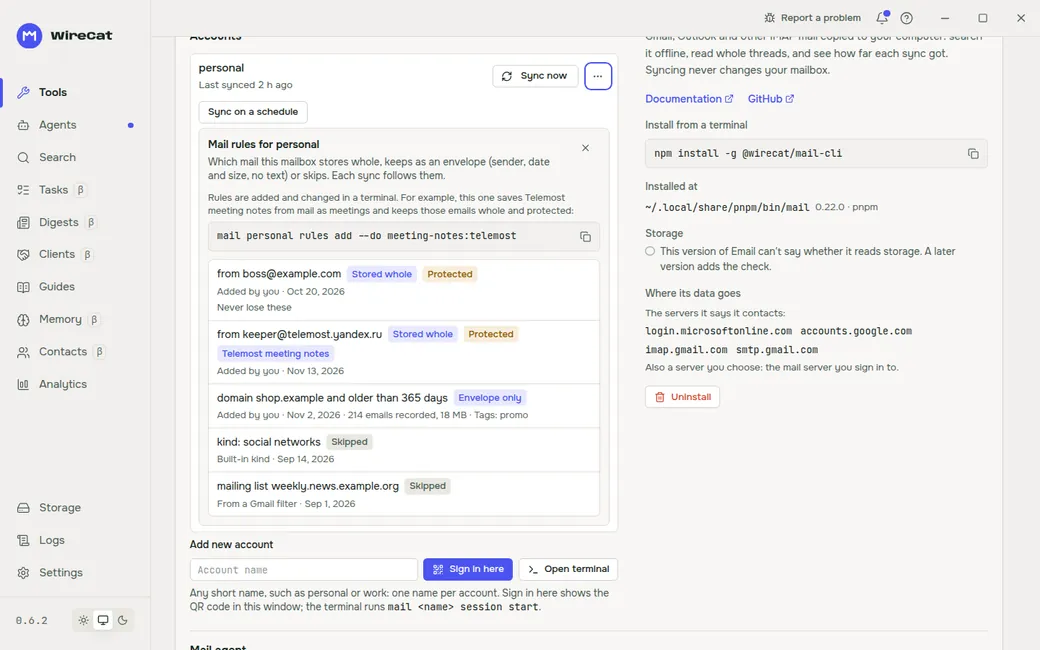
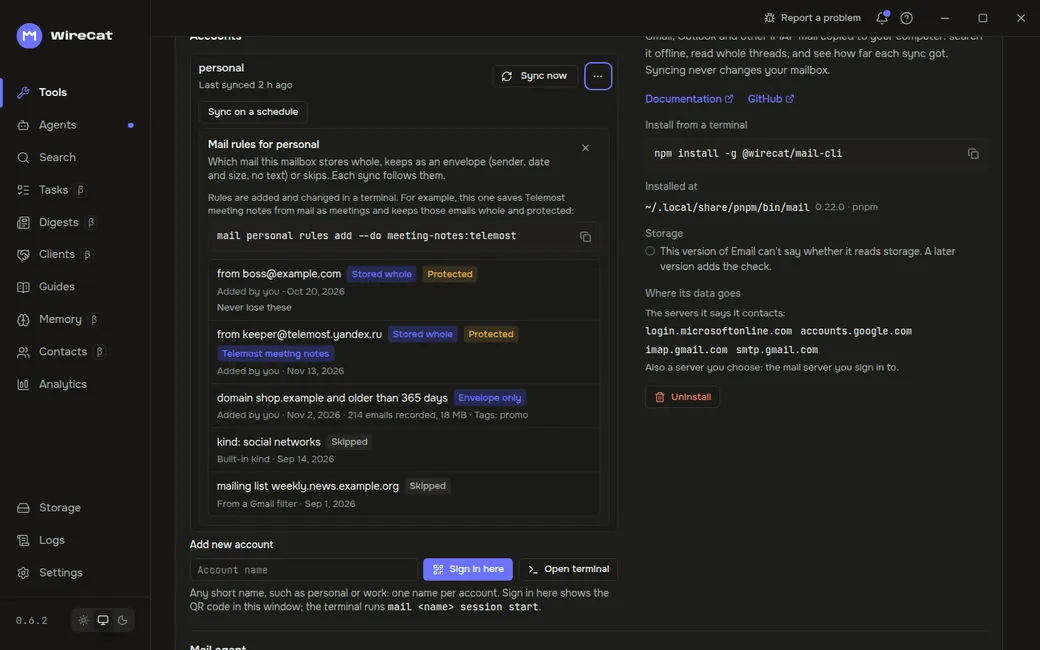
WireCat Desktop shows the mailbox's rules, read only. On the Tools page, open Email, then the ⋯ menu of the account and Mail rules. The Telemost rule is marked Telemost meeting notes. Rules are added and changed in a terminal; the panel shows the command to copy.
If no meeting appears
- No notes arrived. Search the mailbox for mail from
[email protected]. If there is none, check the conditions in Who gets the notes. - The rule is missing.
mail work rules listshows it astelemost meeting notes. If it is not there, add it. - The notes are older than the sync. Run
mail work rules apply, thenmail work rules apply --yes, as in Notes already in your mailbox. - The meeting has a day but no time. No synced Google Calendar event has the same Telemost link that day. Sync
the calendar with gcal before the notes are saved: set it up before you add the rule or run
rules apply --yes.
Next: Meetings shows how to connect meeting findings to projects and prepare for the next call.