Personal account — MAX
MAX: Read conversations, find agreements, collect documents and prepare replies with your connected messenger.
Gather context for a decision: what changed, which materials you need and whom to answer. Choose a task, substitute your chats and send the request to your agent. First tasks offers a short starting request; these tasks combine several messages.
What changed while I was away?
Use max CLI. I missed three days in my work group. Compare the latest agreements with those before I left: deadlines, scope and owners. Show only changes, disagreements and source messages. Do not send anything.Expect a before → after list. For example: Friday’s deadline became Monday; the new date was confirmed, but the new owner was only proposed.
Gather meeting materials
Use max CLI. Find tomorrow’s meeting materials in my work group and conversation with Anna: the current presentation, cost estimate and open questions. Show the latest approval message for each file. List them first; do not download or send anything.Expect approved versions and questions for the agenda. Then ask to save selected files to a folder you specify.
Make sense of a long discussion
Use max CLI. Find last month’s trip discussion in the parents group. Gather the date, meeting place, cost and things to bring. Separate confirmed decisions from proposals and show source messages. Do not send anything.Expect a practical checklist instead of dozens of messages. If the meeting place was discussed but never chosen, it should remain an open question.
Check commitments before replying
Use max CLI. Before replying to the contractor, check our private conversation and renovation group for the last two weeks. What did we promise, what is done and what needs clarification? Prepare a reply with supporting agreements. Show the draft without sending.Expect a checkable list of commitments and a draft informed by both conversations. Unconfirmed dates and promises should remain questions.
Commands and instructions
max allows you or your AI agent to read and write to your personal MAX account from a terminal. This page is an overview: from login to reading, sending and groups, in the order you need it. Open it when you start working with max, or when you want to know what's possible before asking an agent. The bot, which works through the official Bot API, is described on the bot page.
You will learn to identify a chat, read and search without marking messages read, send safely, and return results a script can parse. The command reference is generated from the program; this guide explains how commands fit together.
Terms used below:
- Profile — one MAX account configured here with its own login and settings, chosen as the command's first word (profiles).
- Chat — a direct chat, group, channel or Favorites.
- Local archive — saved messages read by
maxon this computer (local archive). - Send protections — permissions, allowed recipients and hourly limits (security).
max personal serve— the background process sharing one MAX connection across a profile's commands.
Each command performs one task, prints its result and exits. Only max personal serve keeps a MAX connection open. The first command needing MAX starts it in the background; it stops after 15 minutes without use.
The following is a syntax template, not a command to copy. Replace placeholders with the values shown in the examples below.
max [профиль] [опции] <ресурс> <действие> [аргументы]What you can do
Read a chat with your agent
Once your account is connected, ask for a short recap. This task reads messages; it sends nothing.
Your request:
Summarise the five latest messages in Книжный клуб. Show decisions and open questions. Send nothing.
Command:
max personal messages list "Книжный клуб" --limit 5 --jsonExample agent answer:
Decision: the next discussion is Thursday at 18:00.
Still open: which meeting place to use.
I can show the messages behind this recap. Nothing was sent.
The above result is fictitious. Ask to see the original messages before relying on the agent's interpretation. Setup, message actions, and permissions are explained in the sections below.
Getting started
max personal setup # QR-вход и навык агентаmax personal chats list # ваши чатыSetup may take about five minutes. The command checks up to five chats without starting a background service. History is downloaded separately after you choose the chat and amount. Before sign-in, the agent reads max skill show, which is available without a session. max skill show link-conversations prints the shared skill for linking conversations from the archive; no additional sign-in is needed.
Logging in
The first run is max personal setup. For explicit re-login - max personal session start qr: a QR code will appear in the terminal, you will scan it with the MAX application, and the token will go into the keyring. All login methods are login, sessions and profiles. Without a method, max personal session start imports the token received in the official client and puts it in the operating system keyring.
max personal session start
MAX token: ▏               # ввод не отображается
The token is not passed as an argument: the argument is visible in ps to any process on the machine and remains in the shell history. Therefore, it is either asked from the terminal without echo, or read from the pipe:
pass show max/token | max personal session startCI and one-off runs can use MAX_TOKEN, which takes precedence over the keyring:
MAX_TOKEN="$(cat /path/to/token)" max personal chats listCheck your account:
max personal account show # номер телефона целикомmax personal account show --hide-phone # без номераmax account list # все профили на этом компьютере и аккаунт каждого; в MAX не обращаетсяmax personal account sessions list # где ещё выполнен входSign out of MAX and forget the session on this computer:
max personal session endsession end ends the session on the MAX server (revoked_on_server: true). If the token was copied from a web.max.ru tab, that tab is also signed out.
account show --json contains the MAX fields id, name, phone, description and username: null as a general account format. The number is shown in full; --hide-phone leaves it out of the answer.
Profiles use the first word
Multiple accounts can coexist. Supply a profile as the first word, not a flag:
max personal chats list     # профиль personal
max work chats list         # профиль work
The first word is a profile unless it matches a command name. A profile named chats is therefore rejected during creation, with an explanation.
max never picks a profile by itself, even when there is only one: without a name, the command stops and lists the profiles on this computer. The name comes from the first word or MAX_PROFILE.
For a whole shell session, use a variable:
export MAX_PROFILE=personal
max chats list
Each profile has its own token and its own state. The local copy of messages is shared; The data in it is divided by account. More details - profiles.
What to name the chat
The chat is addressed by id or part of the name. If part of the name matches two chats, command will refuse to guess and show the candidates: sending to the wrong conversation is irreversible. Having found the desired chat, then contact it by id - it is in the output, and it does not change.
contacts show accepts an id, @username or name fragment. It also refuses to guess when multiple people match.
The message can also be called one link msg:… from the output search messages - then the id after it is not needed.
Reading
Read does not mark anything as read. The protocol separates "get history" from "mark read" and the second operation is not sent unless asked. You can only mark a chat as read explicitly (below).
Chats
max personal chats list # все чатыmax personal chats list --limit 5 # первые пятьmax personal chats list 'unread_count>0' --offline # только чаты с непрочитаннымmax personal chats show "Иван Петров" # один чат: вид, непрочитанное, последнее сообщение, участникиchats show returns one object containing fields from chats list plus members, excluding you. If the membership is unknown, members is omitted; [] means a known empty membership. For a channel, MAX can return only a few subscribers from thousands, which cannot represent its full membership. See groups and channels.
Messages
max personal messages list 0 # сообщения чата по idmax personal messages list "Иван Петров" # или по имени чатаmax personal messages list 0 --limit 50Read one message and its context; both chat and message ID are required (these IDs are examples):
max personal messages show -1000 100000000000000001max personal messages context -1000 100000000000000001 --before-n 3 --after-n 3In the feed, what you are looking for is marked ◀, in JSON - "anchor": true. If there is no such message - it was deleted or the chat is not the same - this is a “not found” error, and not the adjacent message. id<… in the query of messages list works for any id: the sending time is hardcoded into the id itself.
Message link
max personal messages link <chat> <message> or max personal messages link <msg:locator> returns { locator, url, access, reason }. Personal MAX checks the message in the local archive and returns a locator without a native URL. This command reads only the archive and never connects to MAX, even without --offline. The other account's Locator is rejected. messages links is another command: it explains the connections of conversations (search by topic).
What's waiting for an answer?
max personal inbox # непрочитанное — по счётчику MAX, у каждого сообщения чатmax personal inbox --new # что пришло с прошлой проверки, каждое сообщение один разmax personal inbox --new --jsonl # то же для скрипта: одно сообщение на строкуmax personal inbox 'date>"2026-09-24T09:00:00Z"' # разовый взгляд с этого времениmax personal inbox --all # и чаты без звука, и архивmax personal inbox never marks messages read, so it returns the same unread data until you read it in the app. For scheduled runs, use --new: its saved position advances only after output is printed. The first --new covers 24 hours. The query date>… does not move this position. Your own messages are excluded. If a chat exceeds --limit (default 20), the newest messages are shown, and next has a command for the rest. A run reads at most 20 chats; the others are listed in missing.
Muted and archived chats are skipped unless you were mentioned or replied to; missing reports the skipped count. --all includes them.
Reviewing commitments
max personal review # всё за последние 3 дняmax personal review 'date>"2026-09-23T09:00:00Z"' # с конца прошлого обзораmax personal review 'date>"2026-09-23T09:00:00Z"' --transcribe --jsonThis returns all messages, yours and others', in chats active since that time. Use it to identify promises, things you await and unclear points; interpreting them is your or your agent's job. Nothing is marked read. At most 300 messages are included per chat; exceeding this marks the review incomplete. Muted and archived chats are skipped unless you were mentioned or replied to, as in inbox; --all includes them.
In the terminal, the final stderr line shows the interval covered. In JSON, the first next step is review.next: start the next review from it to avoid gaps. If coverage is incomplete because of too many chats, truncated history or untranscribed audio, this is listed in missing, and review.next starts from the same boundary.
--transcribe transcribes voice messages that do not yet have text: slowly, up to a minute per five minutes of speech, and only if the model has already been downloaded (voice to text). Without the flag, the response will contain the text of those already transcribed. With the flag, what could not be transcribed is listed in missing.
Unanswered questions
max personal review --unanswered # вопросы, на которые сутки никто не ответилmax personal review 'chat:"Соседи"' --unanswered 4h # в одной группе, без ответа 4 часа--unanswered [длительность] leaves only questions that are awaiting an answer - yours or the group admins. Question - a message with a “?” in text or transcript, or in response to your message or an admin message. Saved transcripts are always taken into account; --transcribe hears new voices before selecting questions. An unrecognized entry leaves the review incomplete. A question is considered answered if you or the admin answer it, or speak first after the person who asked. Questions younger than the specified period (for example, 4h, 1d; by default 24h) are not shown: they have not yet been answered.
MAX provides admin information at login only for recently active chats. If unavailable, the command reports it and counts only your answers. Replies after the review's end are not visible. chat: in the query restricts any review to one chat, with or without --unanswered.
Voice messages to text
See the voice recognition guide for model selection, commands and limits.
Voice messages are transcribed on your computer: recordings are not sent anywhere. Download the recognition model once with a separate command:
max personal models list kind:audio # какие модели есть, какие скачаны, какая по умолчанию (*)max personal models download gigaam-v3 # 233 МБ, один разmax personal messages transcribe "Иван Петров" 100000000000000001Models live in a directory shared by MAX and Telegram; WIRECAT_STATE_DIR relocates it. models list kind:audio --json returns an items list with page; each model has its path. Downloaded files are reused. gigaam-v3 remains first, and config set --defaults transcribe_model <модель> selects the model.
| Model | Languages | Size | 5 minutes of speech |
|---|---|---|---|
gigaam-v3, default | Russian; best Russian recognition | 233 MB | ~40 s |
gigaam-v3-ctc | Russian; slightly faster, weaker capitalization | 226 MB | ~36 s |
parakeet-v3 | 25: Bulgarian, Croatian, Czech, Danish, Dutch, English, Estonian, Finnish, French, German, Greek, Hungarian, Italian, Latvian, Lithuanian, Maltese, Polish, Portuguese, Romanian, Slovak, Slovenian, Spanish, Swedish, Russian, Ukrainian | 671 MB | ~60 s |
Timings use one thread on a Ryzen AI 9 HX 470 laptop. Select another model for one run with --model parakeet-v3, or permanently with "transcribe_model": "parakeet-v3" in configuration defaults. Every download is checked against a checksum embedded in max; a mismatch prevents installation.
Text is stored under your account in the shared local wirecat.db, used by messages list, messages transcribe, inbox, review and MCP. Repeating a request by chat id with the same model answers immediately, without network or model execution. Transcripts from the old profile-specific cache are not migrated; --transcribe recreates them. Recordings download over the reading connection, which closes before local recognition. Downloading does not need a second login. Memory usage is about 700 MB (parakeet-v3 uses 1.3 GB).
Transcribe the voice messages in chat or inbox results in one run:
max personal messages list "Иван Петров" --transcribemax personal inbox --transcribe--transcribe processes displayed voice messages lacking text; --model selects speech recognition for one run. max first downloads the required recordings, closes the connection, then recognises speech. The transcript appears below the voice message with 🎤, or in JSON transcript. Failures and their reasons are listed in missing; messages still display. Missing recognition files produce download guidance rather than an automatic download. Files in ~/.local/share/WireCat/models/audio are shared by max and tg.
Existing transcripts appear without the flag. Without the flag, the others are listed in missing with a transcript entry, so a response with them does not look complete. With --offline, new audio cannot be downloaded or transcribed.
Files
Save photos, files, video and audio to a directory, current by default:
max personal messages download -1000 100000000000000001 --output-dir ~/Downloadsmax personal messages download -1000 --all --output-dir ~/Downloads --pause 5s # все файлы чата--output remains the compatible name --output-dir; You cannot specify different directories at the same time. The directory is created if it does not exist. The JSON of one message contains {items}; JSONL - one file entry per line. With --all, repeated run continues to traverse the saved progress; already saved files remain in place.
The file retains its name, the rest - <id сообщения>-<номер>.<расширение>. The existing file is not overwritten: the failure appears in batch and independent files continue. The video is saved as the largest MP4; calls, links and stickers are not downloaded, and there will be a line in stderr about this. Saved files are accessible only to the owner (permission 600). Voice messages have kind: voice in JSON; the extension of the unnamed attachment is selected via HTTP MIME. Sending files, formats and searching by text inside files - attachments.
Chat media, like a gallery in the MAX application:
max personal chats media "Поход" # фото, видео, файлы, аудио и ссылки, как галерея в MAXmax personal chats media "Поход" --type photo,video # только фото и видеоmax personal chats media "Поход" --cursor <курсор> # следующая страница: курсор даёт page.nextThe list comes from the MAX server, including media not downloaded to this computer. Reading marks nothing as read.
People
max personal contacts list # люди, с кем есть личный чатmax personal contacts show @ivan # один человек и общие с ним чатыYou can resolve anyone known to the local archive, including a group member not listed as a contact. contacts show returns name, @username and shared chats, newest first. It only reads: resolving someone does not message them. See people for profiles, recent messages, bot checks and Telegram account links.
Who counts as a contact?
max personal contacts list shows people with whom you have a direct chat, newest conversation first. Group members are also saved with names and shared chats, but do not appear in this contact list.
MAX has no endpoint returning an address book, so only people from your chats are available. Contacts stay current because commands log in and each login requests only changes since the previous one.
max personal contacts sync # забыть, где остановились, и забрать список зановоThis is a repair action for inconsistent local data or a schema update that cleared it, not the normal workflow. Its response contains only counts, no names, phones or descriptions.
Your names and notes about people
max personal contacts aliases set "Борис Тестов" Боря # своё имя для человека, только на этом компьютереmax personal contacts aliases remove "Борис Тестов"max personal contacts notes add "Борис Тестов" --text-file note.txt # или текст из stdinmax personal contacts notes list "Борис Тестов"max personal contacts notes edit "Борис Тестов" <id> --revision 1 --text-file note.txtmax personal contacts notes remove "Борис Тестов" <id>max personal contacts show "Борис Тестов" --with-notesmax personal contacts list notes:квартира # люди, в чьих заметках есть это словоCustom names and notes stay in the local copy and are not sent to MAX. contacts rename changes a name in the MAX address book; that is a separate operation. Commands can find a person by your custom name unless it matches another person’s name; in that case use an ID. --revision protects against editing an outdated note.
Pagination
chats list, contacts list, chats members list and sends list have three pagination options. runs list has --limit and --page; inbox has only --limit; chats events reads events from a specified time without pagination:
max personal contacts list --limit 5 # по пять в страницеmax personal contacts list --limit 5 --page 2 # шестой по десятыйmax personal contacts list --all # всё, без страницmax personal contacts list --order name # по алфавиту вместо «кто писал последним»--all together with --page is a failure, not a quiet victory for one of them. --limit can be written to a settings file; --page and --all are not possible, the page number in the file is needed exactly once and then it gets in the way. sends list without --limit takes the configured limit; its JSON includes items and page with limit and has_more, where limit is the selected list limit, not the number of rows; JSONL produces one attempt entry per line.
⚠ The page number on a live list may repeat or skip a line. The top is the most recent, so a message arriving between the first page and the second pushes someone over the line.
Message history has no page numbers: the query sets the starting point, giving a precise time-based position:
max personal messages list 0 --limit 20max personal messages list 0 'id<116762160362694583' # старше самой старой строки, которую вы видитеmax personal messages list 0 'date<"2026-09-20T01:00:00Z"' # работает и когда того сообщения уже нетmax personal messages list 0 'id>116762160362694583' # что пришло после этого сообщенияmax personal messages list 0 'date>"2026-09-20T01:00:00Z"' # или после этого времениid>… and date>… read forwards: up to --limit messages after the position, oldest first. The page.next step in next names the next page in either direction: pass it to --cursor. The query takes only one starting point; two together are rejected: they describe alternative starting points, not a bounded interval.
The anchor message itself is excluded with both id<… and id>…: MAX returns it, but this program discards it so the next page does not start with the last row of the previous one. With --offline, only id<… works, and only with an ID present in the local copy.
Times accept ISO 8601 or relative values: 30m, 2h, 1d (date>7d covers the past week), or a date such as 2026-09-20. Put an exact time in quotes inside the query, with seconds and an offset:
'date<"2026-09-20T01:00:00+02:00"'. If an ID is missing locally, as a deleted message may be, the command explains the alternative method.
Finding a chat before sending
max personal chats list title:иван --offline # чаты, в названии которых есть «иван»max personal chats list 'title:work kind:group' --offline # только группыmax personal chats list 'unread_count>0 kind:dialog' --offline # личные чаты, где есть непрочитанноеmax personal contacts list name:петров # люди по имени, своему имени или @usernamemax personal search messages "договор" # сообщения на этом компьютереmax personal search messages "договор" # по тексту сообщений, которые уже прочитаныmax personal search messages 'договор chat:42' # в одном чатеtitle: needs at least three characters: two letters match too much of the list to be useful. A chats list query answers only from the local copy, so it needs --offline: MAX itself does not filter the chat list, and without --offline a field in the query is rejected. contacts list name: also searches the local copy and fails while it has no contacts.
Once you find the chat, use its ID from the output; it does not change:
max personal messages list 42 --limit 20max personal messages send 42 "текст"Part of the name is also accepted there - and in chat: of max personal search messages: the chat name is searched among the saved ones, and without --discover, a search in one chat also asks the MAX server (--backend archive - archive only). The search uses search query language: the word also finds its other forms, the beginning of the word is the explicit pattern квартир*, only the exact form is exact:квартира, a Lucene regular expression is text:/pass(port)?/. More details: search.
How many messages matched
max personal stats messages show counts local archive messages without connecting to MAX. Without a query, it counts all saved messages for the current account; with a query, it counts strict Lucene matches as in search messages. Each message is counted once.
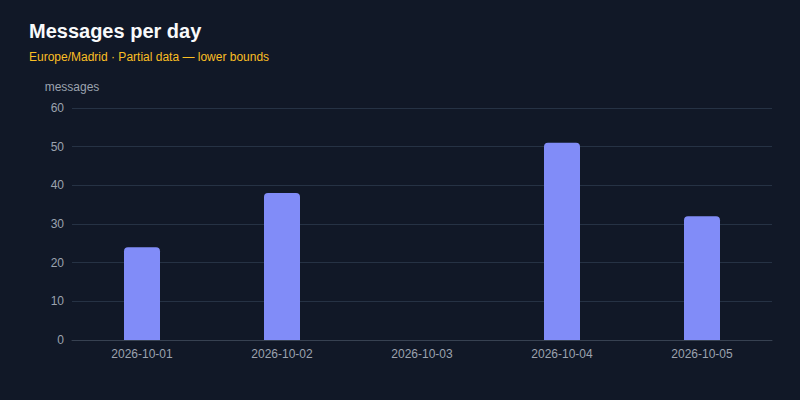
max personal stats messages show "договор" --by chat --jsonmax personal stats messages show --by sender --chat "Работа" --limit 10 --jsonmax personal stats messages show --by day --timezone Europe/Madrid --jsonmax personal stats messages show --by hour --timezone UTC --json--by groups by chat, sender, calendar day or hour. --limit limits the rows, and total is the number of all matching messages. In an incomplete archive, the numbers are a lower bound: check missing before you treat zero matches as proof. To include all saved MAX accounts, add --source max explicitly; without it, other profiles are not included. JSON is one report {item: {by, total, rows}}, with next and missing beside it; --jsonl is not accepted for the report.
max personal stats charts uses the same data to return chart JSON. --output activity.svg saves a dark-theme SVG; --output activity.png saves PNG. Supply the chat identified through max personal chats list. --chart-kind messages counts messages, active counts active authors, membership shows joins/departures. --by day or week chooses intervals; weeks start Monday. --timezone applies to calendar dates.
The chat name synthetic-group in this example is fictional:
max personal stats charts synthetic-group --chart-kind messages --by day --timezone Europe/Madrid --output activity.svg --jsonThe JSON is {item} with the chart description; when the image is saved, it also has file with path and size. The image is written only to a new file, without overwriting. A missing date remains a gap and incomplete data is noted in the description and image. membership requires online chat events and is not available with --offline. Via MCP max_read (command: "stats charts") returns JSON from local storage, without connecting and writing files; format: "png" adds a PNG and JSON image with chart and size image. Entries and exits are not available in it. Reading is subject to permission messages. --jsonl and stdout image are not available.
Message and author rankings: metrics, scores and evidence.
Sending
Nothing is sent if you have not typed the sending command, and the sending does not ask for confirmation: the recipient and the text are already written in the line you typed. Each submission goes through checks: read-only profile, list of recipients and hourly limit (security).
max personal messages send 0 "текст"max personal messages send "Иван Петров" "текст"max personal messages send 0 "встреча **в 15:00**, не _в 14_" --md--md applies MAX formatting: **жирный** or __жирный__, _курсив_ or *курсив*, ~~зачёркнутый~~, ++подчёркнутый++, [ссылка](https://example.com) and inline or fenced code. Styles can nest; positions use UTF-16. Inline-code line breaks become spaces; MAX does not retain a code block's language. Without the flag, text stays literal. In-word _ and * remain literal, and backslashes escape symbols. Links allow http, https and mailto; unclosed code blocks are rejected.
The MAX Bot API formatter also supports ^^выделение^^, headings with # and quotations with >; it safely converts the result to HTML. The personal protocol rejects these three forms before sending or uploading a file. ||spoiler|| remains literal text in MAX. Telegram has its own syntax: __текст__ means underline there, but bold in MAX.
--topic is for Telegram forum topics. MAX rejects it in messages send and polls create before sending; omit it for ordinary chats.
Text from a pipe
Omit the last argument to read the body from stdin:
echo "текст" | max personal messages send 0
max personal messages send 0 <<'EOF'
первая строка

третья
EOF
cat письмо.txt | max personal messages send 0
This supports multiline text and keeps it out of ps and shell history, following the same privacy principle as tokens. All newlines are preserved except one final newline commonly added by echo.
⚠ If stdin is a terminal, the command refuses instead of waiting. max personal messages send 0 without text is treated as a missing argument, preventing an apparently hung command.
Sending later
max personal messages send 0 "напоминание" --at-time 2026-09-25T09:00 # местное времяmax personal messages send 0 "напоминание" --at-time 2h # или через 30m, 2h, 1dmax personal messages scheduled 0 # что ждёт отправки в этом чатеThe message waits on MAX's server and sends even if your computer is off. MAX discards seconds, so time is rounded down to the minute. Less than a minute or more than a year away is rejected.
- Response:
{item: {operation_id, message, scheduled_for}}, containing the queued message and time; themessages.scheduledstep innextshows the queue. Its ID changes when sent. --silentis unsupported: MAX always sends scheduled messages with notifications.- Read-only mode and allowed recipients are checked when queuing. The hourly limit is checked then too, but the message counts in the hour scheduled for sending.
- Missing responses are not retried.
outcome_unknownadvises checking the queue;--operation-idcannot be combined with--at-time. - Cancel or edit in the MAX app.
maxdoes not issue cancellation.
Photos, video, files and voice messages
max personal messages send 0 "отчёт" --file отчёт.pdfmax personal messages send 0 "с дачи" --file ролик.mp4 # видео, которое смотрят прямо в чатеmax personal messages send 0 --file ролик.mp4 --as-file # то же видео файлом для скачиванияmax personal messages send 0 --photo снимок.png # фотоmax personal messages send 0 --voice заметка.ogg # голосовое сообщениеmax personal stickers list # наборы стикеров; --set <id> — стикеры набора с их idmax personal messages send 0 --sticker 51 # стикер, один, без текстаWith --file, .jpg .jpeg .png .webp .gif are sent as photos, .mp4 .mov .webm .mkv as videos, and everything else as files. With --as-file, videos from --file are sent as downloadable files; images are still sent as photos. --photo accepts only .jpg .png .webp. A message can contain one --file attachment and one --photo attachment; videos and files must be sent alone, and the command rejects invalid combinations before uploading. Text is optional. If upload fails, nothing is sent. max does not currently send multiple files in one message. --no-preview is unavailable in MAX: its own client cannot do this, and the command rejects it.
--voice sends a voice message with duration and waveform, like a phone recording. It must be sent alone, without text, file or photo. Use Ogg Opus, the format MAX records; convert other audio first:
ffmpeg -i запись.m4a -ac 1 -ar 48000 -c:a libopus -b:a 32k заметка.oggKnown credential files and folders (such as ~/.ssh), max directories and the message store are protected. Ordinary hidden working folders are allowed. The CLI provides --allow-any-file for an explicitly selected protected file.
Reply
max personal messages send 0 "да" --reply-to 100000000000000001 # ответ на сообщение в том же чатеA reply is a send, so all send options work with it.
Reactions and polls
max personal reactions add 0 100000000000000001 👍 # реакция; прежняя ваша заменяетсяmax personal reactions remove 0 100000000000000001max personal polls create 0 "Обед?" "Да" "Нет" --multiple # опрос отдельным сообщениемmax personal polls show 0 100000000000000001 # варианты с id и сколько за каждыйmax personal polls vote 0 100000000000000001 1 # голос за вариант с id 1max personal polls vote 0 100000000000000001 --retract # снять голос, если опрос это разрешаетmax personal polls close 0 100000000000000001 # закрыть свой опрос; открыть снова нельзяThe interlocutor sees the reaction, as well as the answer. When reading, reactions are printed under the message - 👍 3 🔥 1 (you: 🔥); in JSON this field is reactions: {counts: [{reaction, count}], mine, total}. null means “did not ask”: with --offline or if MAX did not respond - then there is one line in stderr about the reason.
When reading, a poll appears below the message: its question, choices with IDs in [скобках] (used by polls vote), vote counts and a ✓ on your choice. In JSON it is the attachment’s poll field:
{id, question, answers: [{id, text, votes, mine}], total, multiple, anonymous, revote, closed, quiz}. A poll newer than the known version is shown as one line without choices. polls show and polls vote|close responses use the shared tg shape: {chat_id, message_id, question, answers: [{id, text, voters, chosen}], closed, multiple, anonymous, voters} in item; for vote and close, it appears in poll beside operation_id. With --revote, a poll created by polls create allows changing your vote.
web.max.ru does not display polls; it shows “Update MAX…” instead. People reading a chat in the browser cannot see your poll; they need the phone or desktop application.
Other participants can see your vote in a nonanonymous poll. The command rejects closed polls, excess choices, a second vote when revoting is forbidden and nonexistent choice ids before contacting MAX. Voting, closing and creating polls use send protections: voting is a reaction, closing an edit and creation a message. Creating/closing count toward sends_per_hour; votes, like reactions, do not. Votes are not automatically retried. Through max personal mcp serve, voting (max_write, command: "polls vote") and creation (command: "polls create") depend on permissions; closing (command: "polls close") requires polls.close write permission (MCP).
Editing, forwarding, pinning, deleting
max personal messages edit 0 100000000000000001 "новый текст" # только своё; вложения остаютсяmax personal messages forward 0 100000000000000001 --to "Коллеги" # переслать одно сообщение в другой чатmax personal messages pin 0 100000000000000001 # закрепить, без уведомления участникамmax personal messages pin 0 100000000000000001 --notify # закрепить и уведомитьmax personal messages unpin 0 100000000000000001 # открепить; в чате MAX закреплено одно сообщениеmax personal messages delete 0 100000000000000001 --allow-dangerous # только у васmax personal messages delete 0 100000000000000001 100000000000000002 --allow-dangerous # несколько, до 10max personal messages delete 0 100000000000000001 --for-everyone --allow-dangerous # у всех в чатеOther people see edits and may already have read the previous text. MAX permits edits to your messages for 7 days; forwarded copies do not change. Forwarding creates a new message and counts toward sends_per_hour. Edits and pins with --notify also count; silent pins pass safeguards but do not consume the hourly limit.
Pinning is available only in groups and channels. MAX does not pin messages in direct chats or “Favorites”, and the command rejects these immediately.
Deletion cannot be undone, so messages.delete defaults to ask: confirm in the terminal, or pass --allow-dangerous in JSON mode. Explicit allow for permissions.messages.delete permits deletion without that question; readonly and deny forbid it regardless of the flag. By default, the message disappears only for you and remains for the other person. --for-everyone removes it for everyone, and the other person cannot restore it.
Deletion passes send checks. Each deleted message counts toward sends_per_hour like one send, with at most 10 per run. Large deletion bursts resemble automation and can trigger MAX restrictions. Deleted data is removed from local cache and search too.
Message IDs may be separate arguments or comma-separated. After MAX acknowledges deletion, the tool reads the messages from the server. If a message remains or verification fails, it returns outcome_unknown instead of deleted. Check with messages show before retrying; deletion is not retried automatically.
If the outcome is unknown
When sending, if no response arrives, the outcome is outcome_unknown (code 14), neither confirmed success nor failure, because the message may have been sent. The error includes a --operation-id for a safe retry:
max personal messages send 0 "текст" --operation-id 1789784741828MAX does not create a second message if a repeat came with the same cid. If the forwarding response was outcome_unknown, repeat it only with --operation-id from the error - MAX will leave one copy. A repeat without it will be a second copy. The deferred message is not repeated: check max personal messages scheduled <чат>.
Mark as read
max personal chats mark-read "Иван Петров" # до последнего сообщенияmax personal chats mark-read "Иван Петров" --until-id 100000000000000001 # до этого сообщения включительноThe other person sees the read receipt. It passes permission and recipient-list checks but does not consume the hourly message limit. --offline rejects it.
Contacts, profile and folders
max personal contacts lookup # спросит номер; или: echo "+7…" | max personal contacts lookupmax personal contacts add 20000002 # id из lookup, или часть известного имениmax personal contacts remove 20000002max personal contacts rename 20000002 "Соседка" "Анна" # своё имя для человека; он его не видитmax personal contacts block 20000002 # больше не сможет вам писатьmax personal contacts unblock 20000002max personal contacts show 20000002 # профиль, дата создания, его сообщения по общим чатамmax personal contacts check 20000002 # похож ли на ботаmax personal contacts import книжка.csv # строка: номер, запятая, табуляция или точка с запятой, имяmax personal account update --description "о себе" # имя остаётся прежнимmax personal account update --photo портрет.png # новое фото профиляmax personal account privacy show # кто находит по номеру, звонит, добавляет в чатыmax personal account privacy set --calls contacts # звонить могут только контакты; остальное не меняетсяmax personal account privacy set --hide-online on # скрыть «в сети» и «был недавно»max personal chats mute "Поход" # без уведомлений из чата, насовсемmax personal chats mute "Поход" --until 8h # на 8 часов; или до даты: --until 2026-10-09T09:00max personal chats unmute "Поход"max personal chats clear "Поход" --allow-dangerous # удалить все сообщения у себя; у остальных останутсяmax personal chats delete "Поход" --allow-dangerous # удалить чат у себя; у остальных он останетсяmax personal calls list # звонки, новые сверхуmax personal account sessions end --others --yes # выйти везде, кроме этого сеанса — и на телефонеmax personal chats folders listmax personal chats folders create "Работа" --chat -1000 --chat "Проект"max personal chats folders update "Работа" --title "Офис" --add -2000 --remove -1000max personal chats folders delete "Офис" # чаты остаютсяmax personal chats folders order "Офис" "Семья" # после «Все чаты»: эти две, затем остальныеThe phone number is not written in the command line - it is seen by ps and the shell history. An added person with whom there is no dialogue will not appear in contacts list (only those with whom there is correspondence are there); it can be seen through contacts show <id>. You can also block someone who is not in your contacts. MAX does not give a short name (@имя) for a personal account: any is rejected as “This name is unavailable.” The folder name is no longer than 20 characters: MAX does not accept anything longer than that, and max will refuse on its own without sending anything. import sends other people's numbers to MAX. Human profile and bot verification in detail - people.
Contact changes return {item} with operation_id in JSON. add and rename also return person with id, name, username; remove, block and unblock return person_id. import returns sent and recognised: the first counts file rows, including duplicates, while the second contains person records returned by MAX. If MAX returned only phone numbers without records, recognised is empty; phone numbers are not included in the response.
chats folders create and update return {item: {operation_id, folder}} in JSON; delete returns {item: {operation_id, folder_id}}. list returns a page of folders. update requires at least one change: --title, --add or --remove. Identify a folder by ID or exact name; if names repeat, use its ID from list.
account update returns {item: {operation_id, account}} in JSON. The record contains id, name, username (null for MAX) and a masked phone. Read the description after a change with account show. Profile photos must be JPG, JPEG, PNG or WebP. account sessions end --others --yes returns {item: {operation_id, sessions}}, the sessions that remain. If ending sessions succeeds but saving the new token or reading remaining sessions fails, the command reports an error while the journal records the completed action.
Bot buttons
max personal messages show <бот> 100000000000000001 # кнопки под сообщением: [1 Да] [2 Нет]max personal messages press <бот> 100000000000000001 2 # нажать вторую кнопкуmax personal messages press <бот> 100000000000000001 "Да" # или по её текстуThe bot sees who pressed. Only ordinary callback buttons are pressed. For other kinds, the command explains the next action: a link's address appears under the message; use messages send for a text button and chats app for a mini app.
max personal chats start <бот> # запустить бота, как кнопка «Начать»max personal chats start <бот> --start ref1 # с параметром, как ссылка max.ru/<бот>?start=ref1max personal chats start https://max.ru/<бот>?start=ref1 # по ссылке — и бота, которому вы ещё не писалиmax personal chats app <бот> # адрес мини-приложения ботаchats start accepts a bot chat or bot link, including a bot missing from your chat list; its chat will appear. Links to people are refused. Starting is a message from you and uses the same send checks. chats app prints an address that signs in as you: keep it private. Anyone opening it enters as you. The address is not written to logs or files by max.
After a lost start/press reply, outcome_unknown (exit 14) means the bot may already have acted. Check its reply before repeating; there is no automatic retry. Contact and location buttons are never pressed. Presses use reaction checks and do not count toward sends_per_hour. Buttons are visible in messages read from MAX, and are absent from the local copy.
Groups and channels
Scenarios for the group admin, all rules and restrictions - groups you manage.
max personal chats inspect https://max.ru/join/… # что за ссылкой; не вступаетmax personal chats join https://max.ru/join/… # вступить; канал с одобрением ответит requested: truemax personal chats leave "Семья" # выйтиmax personal chats create "Поход" "Аня" 20000002 # создать группу с людьми (имя или id)max personal chats create "Новости" --channel # закрытый канал; люди входят по ссылке-приглашениюmax personal chats members list "Поход" --all # все участники: когда заведён аккаунт, когда был в сетиmax personal chats members add "Поход" "Боря" # без старых сообщений; с ними — --historymax personal chats members remove "Поход" "Боря"max personal chats admins add "Поход" "Аня" --can members,pinmax personal chats admins remove "Поход" "Аня" # снять права; участником остаётсяmax personal chats update "Поход" --title "Поход-2026" --description "в июле"max personal chats update "Поход" --photo обложка.jpg # новое фото группыmax personal chats show "Поход" # настройки группы — в поле settingsmax personal chats update "Поход" --all-can-pin off # поменять однуmax personal chats links show "Поход" # ссылка-приглашение, если вам её видноmax personal chats links reset "Поход" # новая ссылка; старая перестаёт работатьmax personal chats requests list "Канал" # кто просится в канал с одобрением; видят только админыmax personal chats requests confirm "Канал" 20000002 # впустить; reject — отказатьmax personal chats events "Поход" # кто вступил, вышел, кого добавили и удалили — за 7 днейmax personal chats events "Поход" 'time>=2026-09-01' # с 1 сентябряOther people see joining, leaving, adding members and renaming. inspect, link show, events, members list and requests list only read.
Requests to join are available from a channel where approval is enabled; the closed group does not have them. Then chats join only sends the request and requested: true responds, and the channel will appear in the list when the admin accepts it. requests list shows who is asking, but not when: MAX does not report this (requested_at: null). You can answer every request at once with --all; selecting requests by invite link (--link) is not available, because MAX does not report which link a request came through. Actions go through the same checks as sending: a read-only profile will be rejected, a list of recipients will only be allowed into their chats, and an action without names or links will be included in the sending log. create, members add and requests confirm count towards the limit of sendings per hour, one per person - they receive a message. Rejecting an application does not consume this limit. If the recipient list is enabled, you can only call people if you have a private chat with everyone on the list. Nothing is repeated on failure: repeat create - second group.
Group changes return {item} with operation_id in JSON. create, join, update and link reset put the chat record in chat; leave returns chat_id. Adding members returns {operation_id, chat_id, added, not_added}; removing them returns {operation_id, chat_id, removed}. After a successful MAX response, not_added is empty: MAX does not provide a separate list of partial failures; refusing to add a person returns an error. admins commands return person_id; admins add also returns rights without duplicates. link show retains {chat_id, title, link}.
In one update, the title or description and the settings are sent separately. If the first write succeeds but the second does not complete, the command returns outcome_unknown: the change may have applied partially. Read the group with chats show before retrying; requests are never retried automatically.
events reads service messages from chat history: who did what, and to whom. Event types: create means the chat was created, add means someone was added, remove means someone was removed and pin means a message was pinned. Other names appear unchanged. A run reads up to 2,000 messages, oldest first; if there are more, the command tells you where to continue.
members list asks MAX for members, so it works for channels and large groups too; chats show includes only people seen by the local store. Each record includes the role (owner, admin, member; absent if MAX did not report group admins at login), account creation time (registered_at: a very new account in a group is worth checking) and last-seen time (last_seen_at; empty if hidden). It shows the requested page; --all reads all available members, up to 5,000. The command warns if MAX truncates the list or repeats a marker. page.has_more indicates additional rows already read, rather than promising that the full list is available. JSON contains items and page; an absent role means MAX did not report roles. chats inspect shows a link’s destination without joining: id, kind, title, username, participants_count, description, member. Unknown member and username values are null.
You can remove a member but cannot delete that person's messages. Deleting an entire chat for everyone is unsupported. Administrator rights accepted by --can: read, members, admins, info, pin, link, post, edit, delete. read corresponds to the app's Read messages switch; without it, a bot sees no group messages. link permits replacing the invitation link.
Moderation rules
max personal chats rules show "Поход" # правила группы; без них — значения по умолчаниюmax personal chats rules set "Поход" invites delete # приглашения в чужие чаты — удалятьmax personal chats rules set "Поход" newAccount.days 3 # аккаунт моложе трёх дней — отметитьmax personal chats rules set "Поход" trusted 30000003,30000004 # этих людей правила не трогаютmax personal chats rules set "Поход" consent.delete ask # перед удалением — спрашиватьmax personal chats rules unset "Поход" consent.delete # вернуть значение по умолчаниюRules live on this computer beside profile settings; the response names the file. The first group set writes every rule and default, showing all configurable fields. You can edit the file manually; rules show validates it.
By default, rules only report (report). Beyond that, a rule can delete a message or remove a person. Each action has its own consent level (consent.delete, consent.remove): deny means never, readonly means report only, ask means ask first (the default) and allow means act without asking. --allow-dangerous authorizes ask actions for this run. Old forbid, flag and confirm values in files are read as deny, ask and ask.
Group check
max personal chats moderate "Поход" # что нового нарушает правила; делает то, что разрешеноmax personal chats moderate "Поход" --dry-run # только показатьmax personal chats moderate "Поход" --allow-dangerous # сделать и то, что стоит на уровне askmax personal chats moderate "Поход" --since-time 2026-09-20T00:00:00ZThe check reads messages and joins since the previous check, or the past day initially. Messages are checked for blocked authors, invites, links, forwards and flooding; new members against blocklists and account-age rules. You, admins and trusted people are exempt.
Rules and consent determine the action. Everything is reported by default. Each result identifies the issue, person, rule, action and outcome: reported, flagged; done, completed; planned, awaiting a flag or approval, with a manual command; forbidden, disallowed by rules; declined, rejected by you; refused, blocked by profile safeguards or hourly limits; skipped, not reached yet.
In JSON, the response is { item: { chat_id, rows } }. Each check reads up to 1000 messages. Its saved position is in the rules file. --since-time and --dry-run do not advance it. Personal-account MCP uses the same position: max_write (command: "chats moderate").
A check performs at most 10 actions (--max-actions). Deletions count toward the hourly limit; remaining actions are deferred. The next check starts from the first unperformed message. Removed people may return through invite links because personal accounts cannot ban.
There are no applications to join a group in MAX: the group is either open or is entered via an invitation link.
Output: table, JSON and return codes
A terminal displays a table or message feed. --json writes exactly one JSON value to stdout with no spinner, checkmark or warning. Nonterminal stdout, including pipes and CI, selects this automatically. Scripts and agents can rely on that separation.
max personal chats list --jsonEvery list returns one object, including bot lists. One thing is
{"item": …}. Unpaginated lists use page.limit equal to returned count and page.has_more false:
{ "items": [ … ], "page": { "limit": 20, "has_more": true }, "meta": { … } }Beside it there can be next: commands worth running next (the page.next step names the next page), and missing: what the response lacks and why. Keys are in snake_case.
--all and --offline use the same object; --all sets has_more: false. The shape does not encode the data source; exit codes and diagnostics already do that.
has_more means another page may exist, not a total count. It is exact for chats and contacts counted locally; if MAX did not provide all chats, the last page reports has_more: true. ⚠ For messages, it describes our copy, not the whole chat: MAX does not report whether older messages exist. A full page is treated as evidence of more; after a short page, max requests one older message, because a short page can also occur in the middle of a conversation.
In the terminal, the line about the next page goes to stderr: stdout carries data in any mode, but continuation hints do not belong there.
--jsonl outputs one record per line: the data is inside {"type":"item","data":…}.
The last record, {"type":"end",…}, holds complete and page, including whether another page exists.
max personal messages list -1000 --jsonl | jq 'select(.type == "item") | .data | select(.sender_id == "111")'A refusal before any output goes to stderr with stdout empty, so it cannot be mistaken for data.
If the stream has already produced data, that data stays; on a failure it adds an incomplete end record and returns an error code:
{"error":{"code":"authentication_error","message":"no session for profile \"personal\" — run `max personal setup` in a local terminal; agents: read `max skill show`"}}Partial reads or downloads can return JSON with exit code 0: inspect missing and next. Partial download JSONL adds batch_summary; completed work stays saved.
You need to branch according to the return code, and not according to the text: the text changes, the code does not. The entire table is in the command reference, and the most common: 4 - no session, 6 - not found, 9 - timeout, 14 - outcome unknown.
if max personal messages send 0 "текст" --json > /dev/null; then
  :
else
  send_status=$?
  case "$send_status" in
    14) echo "могло уйти, повторять только с тем же --operation-id" ;;
    4)  echo "нужен max personal setup" ;;
  esac
fi
Connect an AI agent
An AI agent with terminal access, such as Claude Code, Codex or Gemini CLI, reads the max skill for rules and pitfalls beyond --help. max personal setup installs it; max skill install also does so (--for claude, agents or default all). Locations are ~/.claude/skills/max-cli/ for Claude Code and ~/.agents/skills/max-cli/ for Codex/Gemini CLI. max skill show prints the same instructions. After updating max, run max skill install again: if the skill is missing or older than max, the agent sees one line about it on stderr once a day. Turn the hint off with max config set skill_hint false --defaults. How agents find skills: Codex, Gemini CLI.
An agent without a terminal (for example, Claude Desktop or Cursor) connects via MCP: MCP server.
Conversation display
max personal messages list and max personal search messages show a feed instead of a table in terminals:
── 3 января 2026 ──

10:05:12  Анна
          созвонимся в четверг?

10:09:03  вы
          ↳ Анна: созвонимся в четверг?
          Договорились.
          📎 photo
          edited 10:09:30
Times are local, with separators between days. вы identifies your messages; unnamed senders use their ID. ↳ marks a reply; ↪ a forward's original author. 📎 marks attachments, as clickable links in colored terminals or addresses without color.
-v adds message, sender and chat IDs and attachment URLs; -vv includes every known field. Show the version with max -V.
New messages as they arrive
max personal watch prints new messages until it is stopped; max personal serve keeps the connection and saves everything to a local copy. How they work together, what a server does on the network and how to set it up as a service - new messages immediately.
What a command did
By default, only run that ends in error is recorded (diagnostics). Two separate things involve diagnostics:
max personal chats list --trace # показать, ничего не сохраняяmax personal chats list --record # сохранить, ничего не показывая--trace prints a stderr line per request, working alongside --json:
→ session.login     op 19  seq 2  871 B
← session.login     op 19  seq 2  213ms  48.0 kB  25 chats  6 contacts
--record saves the same events in a run directory for 30 days:
max personal runs list # что делалось, новое сверхуmax personal runs show <id> # один запуск: чем кончился и куда ходилmax personal runs path <id> # каталог, для jq и grepRecords contain no conversation content. Operations, opcodes, request numbers, IDs, byte counts and durations are recorded. Chat titles, names, message text, phone numbers and tokens never are, including truncated or hashed forms.
Local archive
max saves read messages locally for --offline, search and file export. See local archive for contents, downloading history, exporting and keeping it current.
Settings and what the profile can do
An optional ~/.config/max-cli/config.json file:
{
  "profiles": {
    "personal": { "limit": 50, "timeout_ms": 20000, "color": true, "record": false, "keep_runs_for_days": 30 }
  }
}
The order in which any setting is resolved is: flag → environment variable → file → built-in value. In the file, the profile is stronger than the general defaults, and sections personal and bot set values separately for personal accounts and for bots (max personal config set --personal …, --bot …). All fields, including permissions, are settings. A typo in field name is an error with the field name, not the silent default.
This file cannot contain secrets: its schema has no secret fields.
max personal config set permissions.messages readonlymax work config set permissions.messages.delete allowmax config set --defaults permissions.contacts readonlyLevels deny, readonly, ask, allow are used in both CLI and MCP. The more precise key takes precedence: a separately allowed delete does not allow sending. When ask the terminal asks; JSON requires an explicit confirmation flag. allow does not ask. Other resources and limits are not changed by this example. More details - settings.
One person
max personal contacts show <человек> shows what MAX and the local copy know about the person. max personal contacts check <человек> evaluates whether it looks like a bot. max personal contacts context <человек> reads his latest chat messages from a copy, and max personal contacts link links his MAX account to his Telegram account. Details - people.
Next steps
- Local copy - search, download history, export, backup.
- Settings - the entire settings file.
- Security - what is on the disk and what stops sending.
- Recipes - regular work for your AI agent.
- Installation - installation, update, where everything goes.