WireCat and other tools
What parts a personal AI assistant is made of, which of them WireCat covers, how it differs from OpenClaw, Hermes, ChatGPT and memory systems like Mem0, and how you can use them together.
With WireCat your AI agent can answer "what did we agree with Ivan about the project" and show the message, email or call recording where it was said. It doesn't matter which agent you work in, and your data stays on your computer.
Many people ask on first contact how WireCat differs from OpenClaw, ChatGPT or Mem0. The answer is that these are different parts of one system. Below, step by step, is what a personal AI assistant is made of, what WireCat does, what the others do, and how they fit together.
The main points in one list:
- WireCat is not an agent and not a model. It connects your sources (messengers, mail, meetings, CRM), keeps a copy on your computer and gives the agent fast search and memory.
- You choose the agent. Claude Code, Codex, OpenClaw, Hermes, ChatGPT or Claude in the browser. Change the agent, and the memory stays.
- Memory keeps the records themselves, not a retelling. So the agent can show where it got the answer.
- WireCat adds to OpenClaw and Hermes, it doesn't replace them. They are good as an assistant that is always available, and WireCat gives them your data.
What an AI assistant is made of
When you ask an assistant about something from your life, several different parts are at work. People usually don't tell them apart, and that's where the confusion comes from.
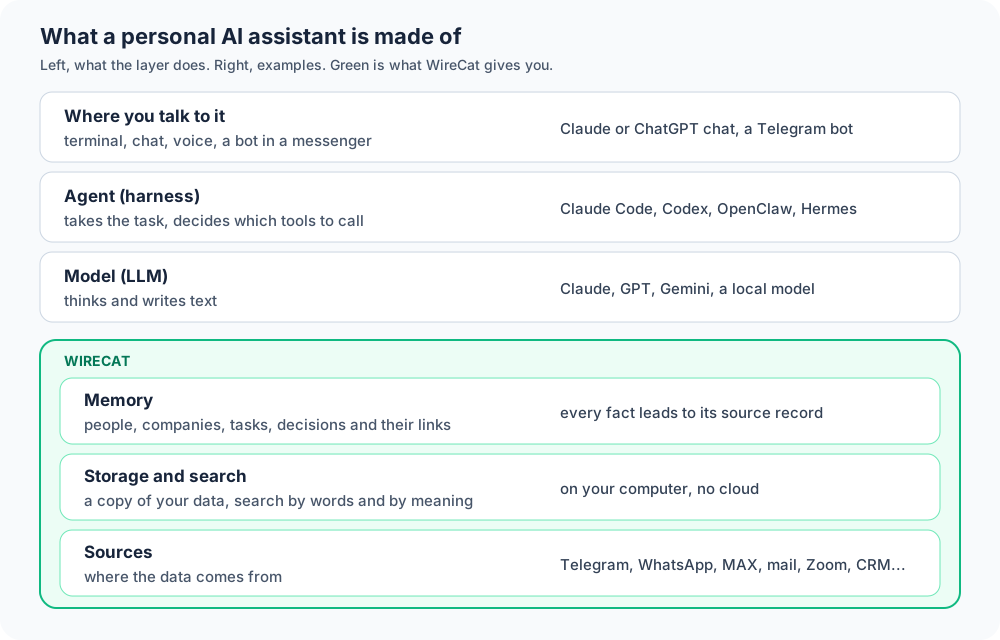
- Where you talk to it. A terminal, a chat window, voice messages, a bot in Telegram. This is just the way in.
- The agent (the harness). The program that gets your task and decides by itself what to do next: which command to run, what to read, what to answer. Claude Code, Codex, OpenClaw and Hermes are agents.
- The model (LLM). The part that thinks and writes text. Claude, GPT, Gemini or a model running on your computer. The agent passes the model the task and what it found.
- Memory. What the assistant knows about you between conversations: who Ivan is, what projects you have, what you decided last week. Without memory every conversation starts from zero.
- Storage and search. Where the messages and emails themselves are kept, and how to find the right one quickly. The agent can't reread all your messages for every question, it's slow and expensive, so you need search.
- Sources. Where the data comes from in the first place: Telegram, WhatsApp, MAX, mail, Zoom, Google Drive, CRM, notes.
WireCat covers the bottom three layers, sources, storage with search and memory, plus the WireCat Desktop app, where you install and set all of it up without a terminal. You pick the agent and the model you want.
What you get with WireCat
- All sources in one place. Telegram, WhatsApp, MAX, mail, Zoom meetings, Google Drive and Calendar, Obsidian notes, Bitrix24. Messengers connect with your own account, so the agent sees the same as you, not only a chat with a bot.
- Search across everything at once. One query over messages, mail, notes and CRM deals. By words, including other forms of a word, and by meaning, when you ask in other words.
- An answer with its source. Every record has a link to the original message, email or CRM entry, and the agent can show it. If a conclusion is wrong, you see it right away.
- People and companies. One person in Telegram, in mail and in the CRM is one contact, not three. A question about a person gathers all their messages from all sources.
- Tasks and agreements. WireCat finds promises and tasks in your messages, and the agent can ask what you promised to whom and what is urgent now.
- Your data stays with you. The copy is kept on your computer, and search works without the cloud. More in Security.
- Any agent. Through the command line or MCP (the standard way to connect tools to agents). Telegram and MAX can also be connected to ChatGPT or Claude in the browser.
WireCat and agents: OpenClaw, Hermes, Claude Code
This is the most common question, because OpenClaw and Hermes also call themselves personal assistants, and they also have memory and connections to services.
OpenClaw and Hermes are agents that run all the time. They do tasks on a schedule, react to events, and you can talk to them by voice through Telegram. WireCat doesn't talk to you and doesn't react to events, except for digests and the mail agent, and I'm not going to turn it into that kind of assistant.
The difference is in memory. Each such agent has its own memory, built for it. If tomorrow you want to move to another agent, you'll have to move the memory, and that's not always easy. WireCat keeps memory separate from the agent, so the same context is available to OpenClaw, Claude Code and ChatGPT alike.
So I'd use them together. OpenClaw or Hermes as the assistant that is always available and answers in Telegram, and WireCat as its data source and memory. Connect your AI agent shows how to connect them.
| Requirement | OpenClaw, Hermes | Claude Code, Codex | WireCat |
|---|---|---|---|
| What it is | an assistant that runs all the time | an agent you start for a task | sources, storage, search, memory |
| Model | you connect any | its own company's by default, another is possible | none of its own |
| Memory | its own, inside the agent | instruction files and the agent's notes | shared by any agent |
| Your messengers | channels to write to the agent, they don't read old messages | only through connections (MCP) | the whole history, from your account |
| On a schedule | yes | yes | digests and the mail agent |
WireCat and ChatGPT or Claude with connectors
ChatGPT and Claude in the browser can also connect Gmail, Google Drive and other services. It's handy and takes a couple of minutes to set up, and if all your data is there, this may be enough for you.
The differences are these:
- Connectors go to the service for every question (on personal accounts). The search is Gmail's or Drive's own. WireCat keeps a copy on your computer and searches by itself, across all sources at once.
- There are almost no messengers there. You can't connect a personal Telegram, WhatsApp or MAX to ChatGPT directly, and agreements usually live exactly there.
- Data goes to the cloud. Everything that is read is processed on the provider's side. With WireCat you can choose what goes out, up to running fully on local models.
And you can combine these too. Telegram and MAX from WireCat connect to ChatGPT and Claude in the browser through MCP. For this your computer has to be on and reachable from the internet through a tunnel, and the text it finds goes to OpenAI or Anthropic, like everything a cloud assistant reads. Use from web or mobile shows how.
WireCat and memory systems: Mem0, Supermemory, Honcho, Hindsight
There are a lot of memory systems for agents now, and each one promises the agent will stop forgetting everything. They work in different ways, and the main difference is what exactly they keep.
Most memory systems give your messages to a model, and it decides which facts to remember. What stays in memory is a retelling, for example "Ivan is in charge of project X", and the agent searches these retellings. That's handy while the facts are right. But the model can make a mistake, miss something important or not notice that a deadline was moved later, and it's hard for the agent to show where the answer came from.
WireCat does the opposite. It keeps the records themselves as they are and builds on top of them things people understand: a person, a company, a task, a project. The links between them, who promised what to whom, who is in which project, also lead back to the original records. The agent searches both the text and these links, and can show the source.
| Requirement | What it keeps | Where the data is | Source of the answer | Its own messenger connections |
|---|---|---|---|---|
| Mem0 | facts the model pulled out | cloud or your computer | a fact, without the original record | no |
| Supermemory | chunks of documents and a graph of facts | cloud or your computer | partly | no, has mail and documents |
| Honcho | messages and conclusions about each participant | cloud or your computer | conclusions without the original record | no |
| Hindsight | facts, people and links | your computer or cloud | partly | no |
| OpenClaw, Hermes memory | the agent's notes and facts in files | your computer, search may go through the cloud | depends on the agent | only new messages to the agent |
| WireCat | the records themselves plus people, companies, tasks and links | your computer | a link on every record | the whole history, from your account |
These systems have strong sides too. For example, Hindsight answers better than we do on questions where a fact changed over time. And all four have ready plugins for OpenClaw and Hermes. A detailed comparison with numbers, including how a plain folder of files does just as well at small volumes, is in the post I benchmarked memory for AI agents.
When you don't need WireCat
- All your data is in Gmail and Google Drive, and the ChatGPT or Claude connectors are enough for you.
- You don't have much data, and a folder of files the agent searches by itself is enough.
- You need an assistant that does things on a schedule and answers by voice, and you don't need to connect your own data. Then take OpenClaw or Hermes.
But if your data is spread across messengers, mail, meetings and a CRM, and you want any agent to find the answer in it and show where it came from, that's exactly what WireCat is for.
Where to start
- Download WireCat Desktop and connect your first source.
- Connect your agent.
- First tasks, to try it on your own data.