
WireCat Desktop is the app that installs the WireCat tools, signs you in and gives your AI agent your chats, mail, meetings, documents and notes, all kept on your computer. With 0.6 you can add any tool built for WireCat, by you, a colleague or anyone else, and I think it is the biggest change since the first release. WireCat is now a platform, and other people's tools work in it like mine.
Add any tool to WireCat
Say your company runs its own CRM, or a helpdesk nobody else uses. You or your agent can now build a command-line tool
for it on WireCat's libraries, publish it to npm and add it to the app by its name. The quickest start is the
template: npx @wirecat/cli-template new <name>-cli --command <word> --package <npm name> --owner <github owner> gives you a working tool with storage, search, the skill for your agents
and an MCP server, and it passes every WireCat standards check. WireCat then installs it, signs
it in, syncs it and gives it to your agents like Telegram or Gmail. No restart.
Such a tool runs as you on your computer and can read everything WireCat keeps. So before anything installs, the app shows you a review. It marks the tool Not verified and says in plain words what the tool says it does: which data it reads and changes, in the service and on your computer, and which servers it contacts. It links the publisher, the repository and the exact commit npm built it from. It lists the things worth a second look, such as a package published last week or code that talks to servers it doesn't declare. And it offers to let your AI agent read the code first. None of this proves a tool is safe. It gives you the facts to decide.
To try it, turn on Allow tools WireCat has not checked in Settings. Tools I have reviewed will come as a signed community list, with their own switch. Add your own tool has both parts, for the people who add a tool and for the people who build one.
Use an AI model that stays on your computer
Some of what WireCat does needs an AI model, for example reading the text in a picture or suggesting facts from a document. You can now choose that model yourself, in Settings, under AI model: one provider, one model and one key for everything. Check tells you in plain words if it works.
The part I care about most is that the model doesn't have to be in someone else's cloud. Choose OpenAI or compatible and give it the address of any server that speaks the OpenAI interface. That can be a model running on your own computer, or on your company's server. Then the pictures and texts it reads stay with you. Ollama on your computer works too. Anthropic, OpenAI and services like OpenRouter are there if you prefer them. Run WireCat on local models shows how to set it up for each feature, and what still goes out.
Two search helpers can use the same model, and both are off until you agree. One adds other words to your notes and emails, so a question in different words finds them. The other reorders the top results of one search when you press Search harder. Each shows what leaves your computer, where it goes and what it costs before you turn it on.
See everyone you talk to in one list
The same person often writes to you in Telegram, sends contracts by email and sits in your CRM. Before, that was three people for your agent. Now you can see everyone from Telegram, MAX, WhatsApp, email, meetings and Bitrix24 in one list, sorted into people, companies, newsletters, strangers and unsorted, and join one person's accounts into one.
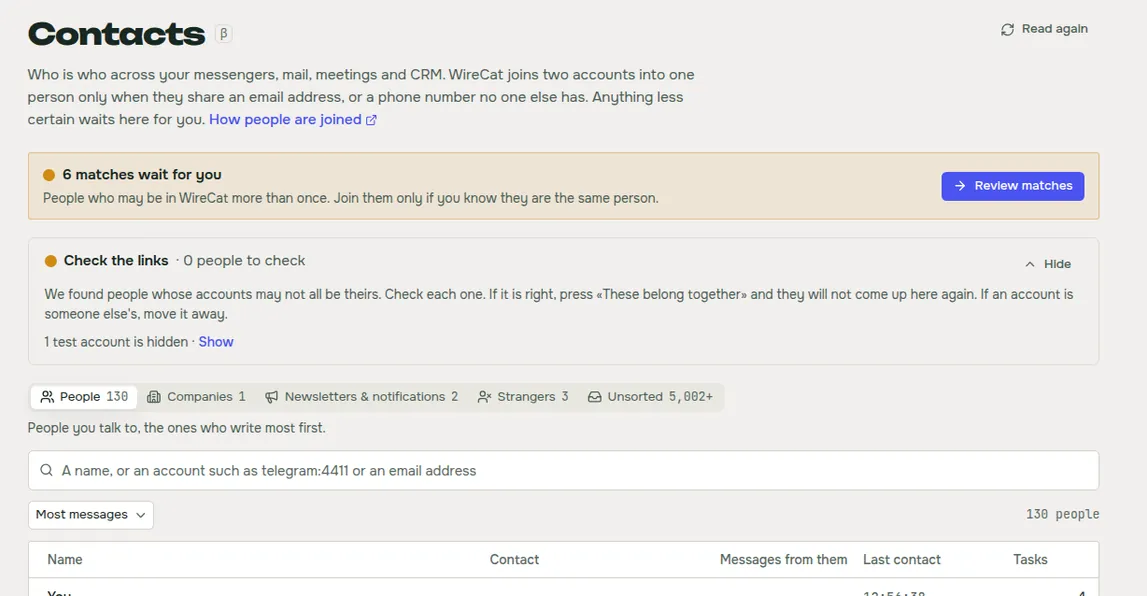
WireCat joins two accounts by itself only when they share an email, or a phone number no one else has. Anything less sure waits for you as a match, and the card says what matched. You can compare two people side by side, with their deals, tasks and latest messages, and join them or keep them apart. You can undo a wrong join, and answer your agent when it thinks one person is really two. This is the Contacts page.
Move your CRM deals on a board
You can now see your Bitrix24 deals and leads as a table or as a board by stage, and drag a deal to its next stage. The change goes to Bitrix24 too. If your CRM names its stages its own way, you put each of them under one of yours once, and deals from every CRM line up on one board. WireCat suggests where each stage goes, and you accept with one click.
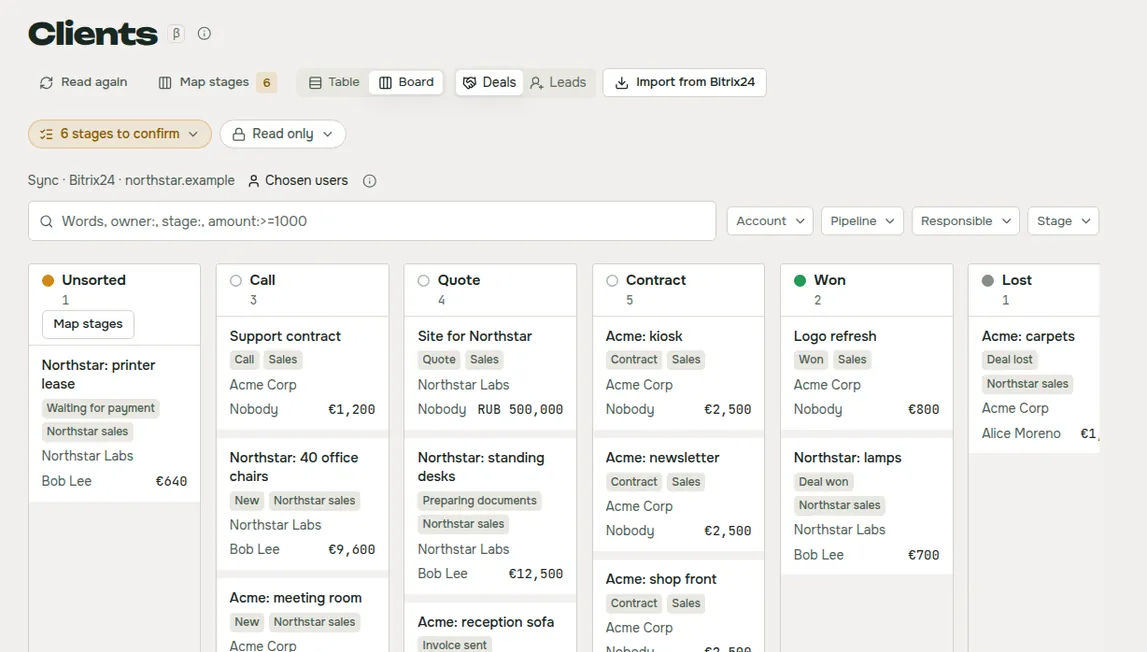
The sync copies only the deals of the CRM users you choose, not the whole portal. In a team CRM most deals are other people's, and your agent doesn't need them. This is the Clients page.
Get a digest every morning
You can now get one short summary of what came in and what waits for you, from your chats, mail, meetings and tasks, every morning or every week. You pick when it runs, what it reads, and where it goes: the app, a Telegram bot or mail. You set a cost limit, so a busy day can't surprise you. You can get one right now, change what it collects and how it looks with a preview, and build the digests of past days to read in the app.
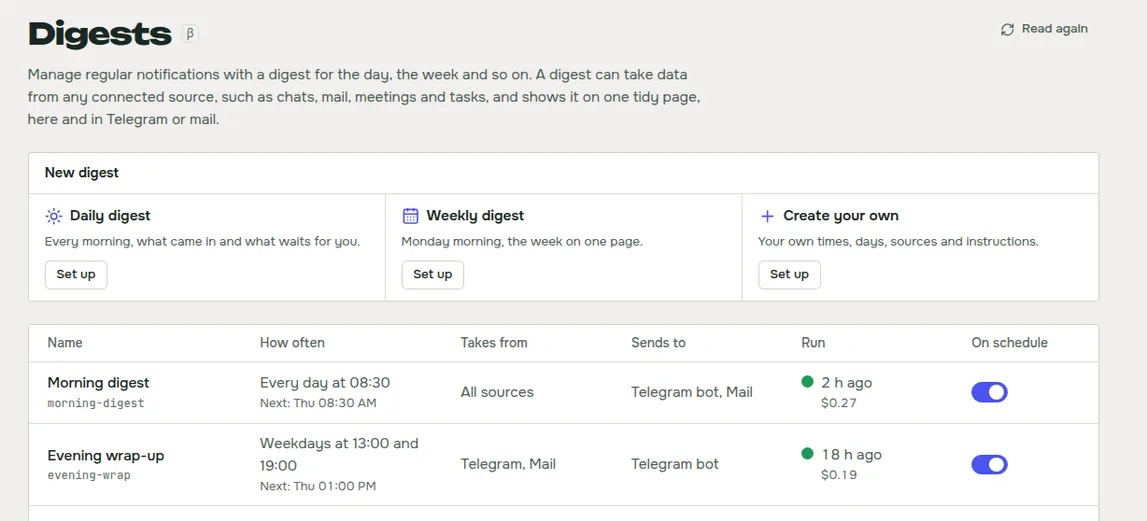
Claude Code writes the digests, so you need it installed. This is the Digests page.
Decide what your agents remember, with the source in front of you
Agents connected to WireCat save what they learn about you and the people around you, and nothing counts until you approve it. On the refreshed Memory page you can now see, for each suggestion, where it came from, what agents will know, and what Approve and Reject change. You can edit a suggestion before you approve it, and see when its source changed or went away.
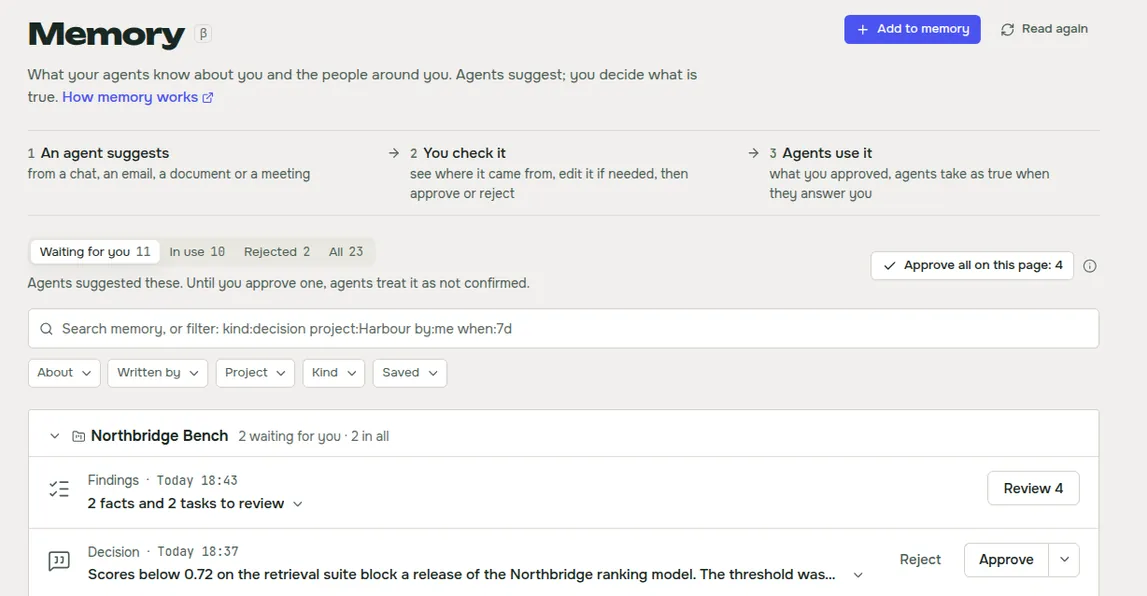
You can also add to memory yourself: paste a note, give a link, a file or a picture. WireCat keeps it as a document you can search, suggests facts from it, and keeps the ones you tick.
Smaller things
- Sign in to every tool the same way. Each sign-in says what to have at hand, shows its steps and has a Back. A failure says what happened and one way to fix it. You can sign in to MAX with a token, to WhatsApp with a phone number and a code, and to Gmail with Google directly, with no Google Cloud setup of your own.
- Remove an account from its menu, and choose to keep or delete its data. Telegram accounts are only signed out for now.
- Open a
wirecat://link to a chat, a message, a task or a digest, and the running app shows it. - Check for updates from the Help menu.
- Import records from a CSV or JSON file in Storage, with a check that lists each refused line.
- See the tasks Memo found in your chats on a calmer Tasks page.
- Open pages much faster. A page you opened in the last minute shows at once.
Get it
If you have 0.5, the app offers the update itself. New here? Download WireCat from wirecat.dev/download for macOS, Windows or Linux. The Desktop guide covers each page, and the full list of changes is in the release notes on GitHub.
Contacts, Clients, Digests, Memory and Tasks are marked beta, with a small β beside the name. If you build a tool for WireCat, or Contacts joins the wrong people, tell me on Discord or open an issue on GitHub. I read all of it.